Sunday, September 7, 2014
5 Technologies You Should Consider Using in the Classroom by Don Waisanen
Saturday, February 15, 2014
No More Snow Days?
Hun School teacher holds class via tablet as she sits in Pa. turnpike gridlock
By Alyssa Mease/The Times of Trenton
on February 15, 2014 at 6:30 AM, updated February 15, 2014 at 6:33 AM
Friday, August 9, 2013
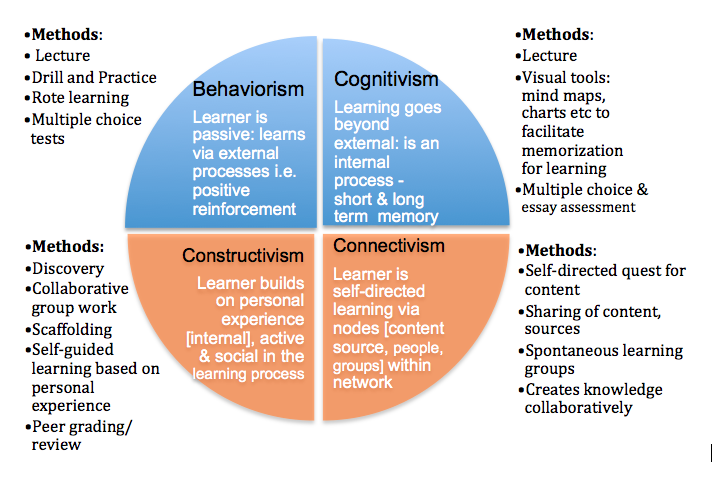
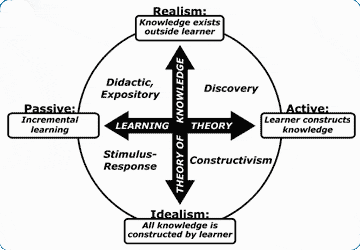
Learning Theories and Course Design
Thursday, April 26, 2012
Case Based Learning and Cognitive Flexibility Theory
Thursday, March 29, 2012
Context Based Instruction
The idea that “…knowledge is less likely to remain inert when it is acquired in a problem-solving mode rather than in a factual-knowledge mode,” is at the heart of these pedagogical models.
As an educator, reading and thinking about these approaches to learning is both interesting and inspiring.
In Goal-Based Scenarios, it is critical that the teacher identify areas of student interests; of course, every good teacher knows that you have to get to know your students. Once the teacher is aware of student interests (and they are varied), then a learning scenario can be devised to involve the student with the curriculum. The optimal Goal-Based Scenarios embed curriculum and create goals that require students to develop a specific set of desired skills. The planning of a Goal-Based Scenario will begin with desired skills in mind, then develops goals that interest students (context). The seven steps can be followed when devising Goal-Based Scenarios:
1: Learning Goals
• content and process goals
2: Mission
• a relevant and realistic mission that will motivate students
3: Cover Story
• a plausible and important task that will create the context for learning
4: Roles
• students have specific tasks
5: Operations
• the activities students conduct to reach their goal
6: Resources
• necessary, even conflicting, resources to complete goal are provided to students
7: Feedback
When students are motivated and interested, real learning will inevitably take place. Goal-Based Scenarios take into account student needs and interests; in addition, students practice valuable 21st century learning skills: using various means of communication, meaningful collaboration with peers, creativity, and critical thinking.
Adherents of Situated Cognition & Cognitive Apprenticeships hold that knowing is inseparable from doing and all knowledge is situated in authentic activities in relevant contexts. Skills are acquired through these authentic experiences in context and through communicating with peers and experts about those experiences. Like the Goal-Based Scenarios mentioned above, student learning activities in the Situated Cognition model should be focused toward a relevant outcome. In the classroom, the teacher is advised to model, coach, and fade. This is an excellent description of the teacher as facilitator model desired by many educators. Knowledge and learning comes from creative problem-solving and “thinking on the fly” rather than the storage and retrieval of conceptual knowledge; therefore, learn by doing can be considered the motto for this educational model.
Anchored Instruction
In the two learning models above, students learn desired, specific skills as they work to creatively to solve meaningful problems, problems often related to the real world and designed with student interests in mind. Anchored Instruction presents, often through a narrative, a realistic (but fictional) situation which raises an over-arching question or problem. As contrasted with Goal Based and Situated Cognition, the problems to be solved in Anchored Instruction are formulated and solved by the students. In the Jasper series, for example, students glean the necessary facts, often having to discern and discard irrelevant or superfluous information, from the narrative. This model seems to me, so far, the most difficult to create for the classroom. That’s why I’m working on one.
The STAR Legacy model also poses an interesting, real-life problem for students to solve in a series of specific steps. This problem is open-ended and provides opportunities for student reflection; this is Step 1: The Challenge. Students begin by activating prior knowledge through brainstorming exercises; students will revisit these thoughts later in the process; this is Step 2: Initial Thoughts. In Step 3: Perspectives and Resources, students use provided resources to work through the challenge. In Step 4: Assessment, students are formally assessed to find out what they have learned and what they can do with this knowledge. During Step 5: Wrap-Up, students return to their initial thoughts in Step 2 to compare them and reflect on what was learned as a result of the activity.
MOST Environments
The MOST model would help students improve reading comprehension skills through improving listening comprehension skills, an important, yet often overlooked, component of literacy. In addition, digital literacy skills can be enhanced through the inclusion of interesting, and therefore, motivational, audio, video, and interactive media. In addition, subtitles and captions can be used to support literacy and reading comprehension skills. The MOST model may be of interest and use to educators integrating Common Core, especially with its emphasis on the use of texts in increasing complexity.
Wednesday, March 21, 2012
What the 4C's Look Like
Thursday, February 23, 2012
Models of Collaborative Learning
“Odds are pretty good that [students] will be asked to work with others from around the globe collaboratively to create content for diverse and wide-ranging audiences. Odds are also pretty good that they are going to need to read and write effectively in linked environments as they locate, analyze, remix, and share the best, most relevant content online for their own learning"(Richardson, 2010).
My initial reactions to these learning models were interest and a vision of how these may look in the classrooms of my school. I do, however, realize that there are barriers to the successful implementation of these learning models. Foremost is the dependence on student self-motivation. If students are unable or unwilling to maintain the focus and levels of perseverance and performance required, the time will be wasted. There is also a question of relevance: can I develop relevant learning opportunities for my students? The benefits of implementation will be increased student learning, student leadership, and participation in the decision making, problem-solving process. These skills will be needed for student success no matter their path in life.
There are similarities and differences between the models: each develops individual student knowledge through active participation in cooperative learning experiences. “Real learning moves beyond the memorization of facts, encourages the learner to be actively involved in the learning process, and occurs best when it occurs within a community of learners” (Trivette, 2005). Collaborative tools that facilitate these instructional models include Google Docs and Google Sites. They both allow students to work on documents or websites at the same time.
In Guided Design, students work collaboratively to investigate and solve real world problems and find answers to open ended questions; the collaborative nature of the student group models real-life situations: students must function as a member of a group, assessing and offering information and ideas, justifying or rejecting based upon merit and validity. Unlike the models that incorporate research, guided design is based on a student’s prior knowledge. The strengths of guided design include increased student motivation through the use of real world situations; students can develop collaborative problem solving skills and practice decision making skills. The weaknesses of guided instruction include difficulties for teachers to manage groups, especially in large classrooms; difficult to motivate unmotivated students. Teachers may also find it difficult to develop relevant learning activities.
Cooperative learning combines academics with social learning experiences in which students share responsibility to complete tasks. Students share and evaluate information and ideas; because student success depends on the group’s success, students must monitor each other’s work. While this has the benefit of increasing student motivation, a cooperative learning group saddled with an unmotivated student can suffer. However, this challenge can be educational and enlightening as students learn to deal with adversity. Students assume roles within the group; these roles can remain fixed or can rotate.
Problem-based learning requires students to develop knowledge, problem solving skills, collaborative skills, self-directed learning, and self-motivation as they work in groups to find solutions to realistic problems. Students synthesize prior and new information in effort to resolve the problem. The teacher facilitates learning by providing necessary motivation, monitoring, and scaffolding.
Situated Learning and Cognitive Apprenticeship requires the teacher to enlist the aid of experts to teach students skills in context. For example, students role play in a real or virtual environment: workshop, construction site, kitchen, or garden. Skype, Google+ hangout, and other tools that allow for virtual face-to-face communication between students and mentors can be used for Situated Learning and Cognitive Apprenticeship. The online delivery of this learning model may be facilitated through the use of avatars and virtual worlds.
The successful implementation of these learning models will lead to greater student self-motivation and an increase in student communication, collaboration, and critical thinking and creativity skills.
Richardson, W. (2010). Blogs, wikis, podcasts and other powerful web tools for classrooms. Thousand Oaks, CA: Corwin.
Trivette, C. M. (2005). Effectiveness of guided design learning strategy on the acquisition of adult problem-solving skills. Bridges 3(1).
Thursday, January 26, 2012
Personalized System of Instruction? That Sounds Like 1:1!
Personalized System of Instruction (PSI) is sometimes called the Keller Plan and that's because it was developed by Fred S. Keller, along with others, in the 1960s. The research shows that when compared to traditional lecture-based methods of instruction, The Keller Plan has an influence on learning that is significantly positive.
As I learn more about this method of instruction, I see its relation to the use of instructional technology, especially as this technology facilitates distance and independent, self-directed learning. Traditional classroom teachers, even those not yet in a 1:1 or technology rich environment, will most likely find they incorporate many, if not all, of the five elements of the Keller Plan.
- In PSI, written texts provide the medium through which new ideas and content should be presented. This is not to say that other media is not to be used (I would be hard pressed to find a teacher who says that the role of digital media is sure to decline), only that there is great instructional value in texts which are in the students possession; i.e., texts that are portable, can be read at a place and pace determined the student, and can be reviewed and annotated by the reader. My school is demonstrating a renewed emphasis on literacy and the use of grade level texts, and as we increase our use of ebooks and ereaders, we are seeing the potential in portable and personal text. This is not to say there are no drawbacks, but we are learning how to use this new technology.
- While the teacher may establish the order in which lessons are done and units of study completed, students proceed through the material at their own speed. Again, this sounds like a 1:1 classroom.
- Students have time to explore the material at their own pace; they are no longer compelled to stay on the same page. This is the promise of education enhanced through technology: personalized instruction.
- The previous bullet point notwithstanding, students must demonstrate mastery of the material before they are allowed to progress to the next unit. Students who are unable to demonstrate mastery are redirected and review unit materials. Being allowed to continue is, to behaviorists, sufficient motivation; classroom teachers, those jaded and otherwise, know that for some students, "being allowed" to move on to the next unit of study is hardly motivational.
- The future classroom teacher will be more of a facilitator of learning rather than the fount of knowledge. They guide students by addressing areas of weakness and modifying learning activities based on constant formative assessment. Teachers will model and reinforce the learning behaviors necessary for success.
Sunday, January 22, 2012
Why Public Education?
Friday, January 13, 2012
Photostory 3
Sunday, November 20, 2011
Today is the Day
It's always trouble that makes you strong
Today is the day, today is the day
Today is the Day – Yo La Tengo
There are several reasons why this refrain from Yo La Tengo’s Today is the Day is appropriate for online learning and why it keeps running through the background music in my mind. One, if a student in distance education wants to stay caught up, there’s really no time to wait: there’s an assignment to do, and today is the day. Another reason is that today is the day could be a slogan for educators contemplating/integrating educational technology in their classrooms. Depending on the comfort level of the teacher, it could either mean today is the day to just try it or today is the day to do it differently or better. Finally, today is the day means exactly that: today is the day: technology integration is happening, not in the future, not even tomorrow, but right now – today is the day.
Tuesday, November 8, 2011
The Flat World is Better Off
I recently reread Thomas Friedman's The World is Flat and found it reads differently now than it did before the global, debt fueled financial troubles began to surface. The implications of Thomas Friedman’s flat world on education in general and student preparedness in particular are real; however, in light of recent economic upheaval which can be blamed, in part, on forces that use globalization in pursuit of profit despite resultant cost to country or society, Friedman’s sometimes breathless promotion of a flat world can ring hollow to some readers today. Like the world of Friedman’s book, education is also “changing due to the advances in technology” and our society is undergoing change in response to these forces. Educational technology in the hands of teachers and students can change the traditional classroom from one that is hierarchical with clear lines of command-and-control to a much more open, unstructured, and non-hierarchical configuration. What are the ramifications of a flat classroom? Will the tools that we use in distance education lead to future outsourcing of teachers or open sourcing of education? A bill in the Florida legislature will allow for outsourcing of teachers. The bill's sponsor, state senator Anitere Flores (R-Miami), calls it "broadening the choices available to school children and their parents. Teachers call it "outsourcing."
Wednesday, November 2, 2011
Google Sites
What is Google Sites?
Google Sites allows users to easily create free, custom, fully functional websites.
Google Sites began as JotSpot. Google purchased JotSpot in 2006, and Google Sites, using the JotSpot technology, was launched in 2008.
Features
Google Sites lets students work together to create webpages and edit content; this feature is especially attractive to educators in the 21st century classroom.
Information can be organized and stored in a central place (on the web) so that viewers and editors can access the site from any device and anywhere there’s an internet connection.
Access to view the website or pages can be restricted, and only collaborators who have been invited can make edits. Edits are recorded; this means editors can be identified and edits can be rolled back.
Google Sites works really well with the other Google Apps, and teachers and students can easily add documents, images, presentations, spreadsheets, calendars, forms, embedded media, and videos to the webpages they create.
25 GB of storage for Google Apps users (100 MB of storage for free account)
WYSIWYG editing; there are many templates to choose from.
How Google Sites can be used in the Language Arts classroom
Classroom webpage (communication, announcements, assignments, calendar, student work, links, etc.)
Project based learning
Platform for student products (see student created sites link below)
Classroom discussion and sharing of ideas
Responses to literature
Online newspaper, digital literary “magazine”
Collaborative writing projects and presentations
Group projects
Student portfolios
A platform for international collaboration
Provides a larger audience for students
Incorporate technology and give students anytime access to the classroom
Give students experience working in a collaborative, online environment
Battle of the Books team, clubs
Examples
More Google Sites for education
More information
Tuesday, October 18, 2011
Edmodo - (if it's not )The One Tool to Rule Them All (at least it helps)
As students and teachers anxiously await the arrival of the protective cases which will finally free the laptops from the proximity of their classroom carts, the excitement continues to grow. Teachers with varying levels of experience and comfort have started using Edmodo as a way to organize and manage their classrooms and assignments. Students like it because it looks like Facebook and it helps with organization. Edmodo has a number of features that make it attractive to teachers. Foremost, it is private. Students create an account for which an email address is not required, and then users join classes using a code provided by individual teachers. The code is entered once and the student joins the class; each time the student logs in to Edmodo, their classes appear on a sidebar menu. Teachers post notes, links, announcements, alerts, assignments, polls, and quizzes. Teachers can communicate to the entire class, to small groups, or to individual students. Student posts are private to the teacher or to the group; there is no private chat between students. A code for each student is available that gives parents access to the Edmodo account of their student. In the class, students can read comments from their peers and add their own. If a student has trouble with this freedom, their status can be set by the teacher to "read only" until the student is ready to demonstrate a better understanding of cyber citizenship. The creators behind Edmodo are very receptive to the concerns of teachers and respond quickly and thoughtfully to suggestions for improvements. These are some of the reasons I advocate the use of Edmodo in the classroom, especially in 1:1 environments. I look forward to learning more about this useful tool and how it can be used to facilitate learning.
Tuesday, September 27, 2011
Should Students Be Using Technology in the Classroom?
Critics of a connected classroom correctly point out that attention spans, already shortened by TV, have been made even shorter by the point and click, sound bite content that dominates the Internet. It is true that the Internet lacks any quality control, and there is much that could be considered inappropriate for none but the most jaded or corrupt. While I understand the point made by David Gelenter when he answers an emphatic" No" in a 1998 Time magazine article entitled Should Schools Be Wired to The Internet?, and I agree that a large amount of information available to a populace doesn't necessarily correlate to a well-informed citizenry, the future seems to require, for better or for worse, the ability to navigate through an environment filled with information and rapidly changing technology. Therefore, if schools and educators intend to prepare students for the future, these students will have to learn to navigate this future and thrive using the tools that, in the words used by Vice President Al Gore to answer the question posed by the article in the affirmative, “dominate the economy and shape our society. “ Students are well-served by teachers who incorporate into their lessons instruction on how to navigate through this landscape of the present and future.
Anecdotal evidence from my own teaching practice concurs with the articles from Bread Loaf Teacher Network which point out the many benefits derived from collaboration facilitated through technology. Many students succeed when given the opportunity to create expressive products using technology. The students studying Beowulf in the connected classrooms grew in their abilities to express themselves through text, and other teachers describe the strides made by students in areas such as writing, critical thinking, communication skills, and even empathy through the types of online collaboration referred to in the Harris article, Curriculum-Based Telecollaboration. Of course, collaboration, especially with peers, opens both teacher and student up to criticism and judgment, and this can be uncomfortable.
There will always be technical problems, and there will be some teachers who use technology to pacify students. But there will be many more teachers who will use technology to enlighten and motivate, and there will be students whose lives will be enriched and whose education will be propelled through the use of technology in the classroom.
Friday, September 23, 2011
North Carolina's Education Numbers
This information will be of interest to many North Carolina citizens, especially parents, students, and educators. The Friday Report is published weekly by the Public School Forum of NC.
Education Cuts Highlighted in Fitzsimon File’s Numbers
Published: by Chris Fitzsimon
Fitzsimon File’s Monday’s Numbers
Monday, September 19, 2011
16,678—number of jobs eliminated in public schools in North Carolina in the last four years (“North Carolina’s Disappearing Educators,” N.C. Budget and Tax Center, September 2011)
8—number of school districts in North Carolina that have eliminated more than one in five positions compared to 2008 staffing levels (Ibid)
24—number of school districts in North Carolina have eliminated more than one in ten teacher positions compared to 2008 staffing levels (Ibid)
31—number of school districts in North Carolina have eliminated more than one in four teacher assistant positions compared to 2008 staffing levels (Ibid)
49—ranking in 2007-2008 of North Carolina among 50 states in administrative spending for public education (Ibid)
1,445,628—number of students enrolled in North Carolina public schools in 2008-2009 school year (N.C. Department of Public Instruction)
1,480,991—number of students expected to enroll in public schools in 2011-2012 (Senate Education Committee on Education Target Comparisons, Fiscal Research Division, N.C. General Assembly, May 11, 2011)
0—number of teacher and teacher and teacher assistant positions that House Speaker Thom Tillis said were cut by the General Assembly in the 2011-2012 budget (House Speaker Thom Tillis, June 15, 2011)
534—number of teachers laid off in public schools due to the cuts made in the 2011-2012 budget (“Public Schools Have Cut More than Eight Percent of Staff Since 2008-2009, N.C. Department of Public Instruction News Release, August 31, 2011)
1,260—number of teacher assistants laid off in public schools due to the cuts made in the 2011-2012 budget (Ibid)
2,418—total number of layoffs in public education in 2011-2012 due to budget cuts made by the General Assembly (Ibid)
6,307—total number of public school jobs that have been eliminated in 2011-2012 due to budget cuts made by the General Assembly (Ibid)
4,000—minimum number of current public school jobs funded by one-time federal stimulus dollars that will be gone in 2012-2013 (“North Carolina’s Disappearing Educators,” N.C. Budget and Tax Center, September 2011)
45—ranking in 2007-2008 of North Carolina among 50 states in per-pupil expenditures for education (Ibid)
49—ranking in 2010-2011 of North Carolina among 50 states in per-pupil expenditures for education (N.C. Department of Public Instruction)
Thursday, September 22, 2011
Wikis in the Classroom

Wikis, a web-based document that can be quickly and easily edited, viewed, and shared by many people, are useful to both students and educators. I first used wikis as a format for student products. In one example, a small group of students worked independently to contribute to a group project. Each student was able to make contributions and corrections to the final product.
In this project, students imagined the trials and tribulations faced by early immigrants to our state. Along the way students answered the following questions for the fictional character they created: Where did the early settlers of our state come from? What compelled them to make such a treacherous journey? What hardships did they face? What did they find when they arrived? Through the use of historical fiction, students create stories for these intrepid emigrants who were the first immigrants to the new world called Carolina.
Through research, students gathered the sufficient background knowledge they needed to create the pages that make up this wiki. In addition, students selected images, practiced literacy skills, incorporated technology, demonstrated critical thinking, and worked cooperatively to solve problems.